Senin, 22 Juli 2013

Example Invoice

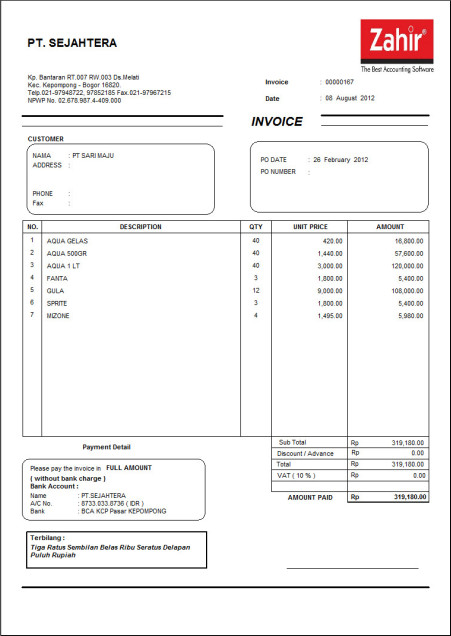
Here is an example of an invoice, such as Sales Invoice, Invoice Half Page, Tax Invoice and Invoice generated more easily by Zahir accounting software.

Examples of Sales Invoice / Invoice

Sales invoice or invoice is commonly used or serve as proof of the transaction for the customer. Design of Zahir's invoice can be designed in accordance with the wishes or needs of the company.
contoh faktur penjualan

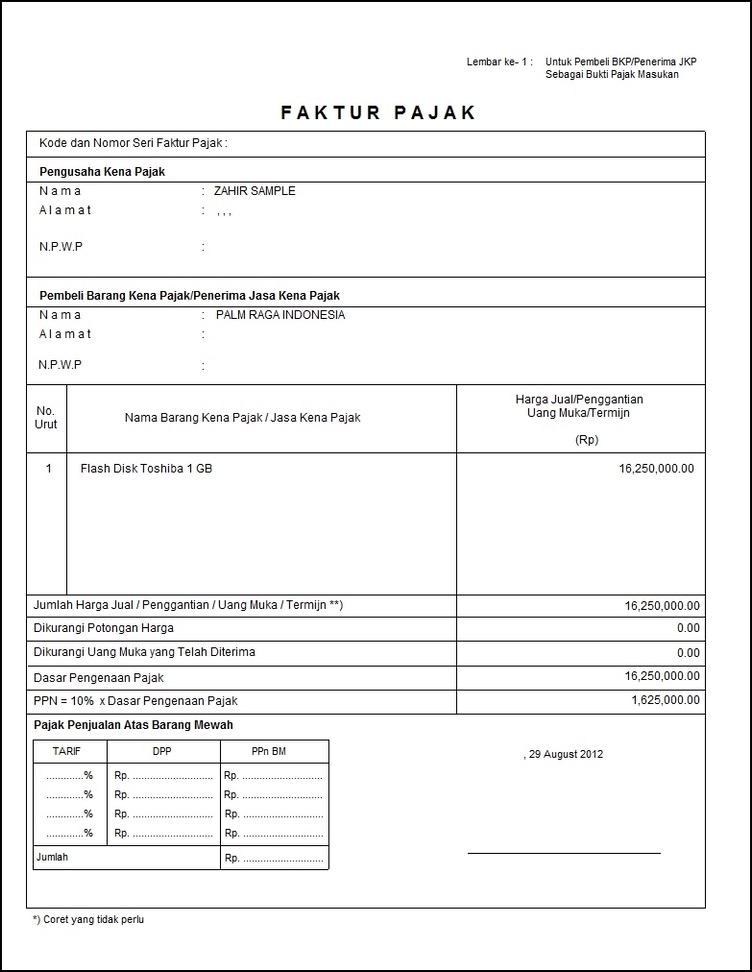
Example of a Standard Tax Invoice

contoh faktur pajak standar

Example Invoice Half Page

contoh faktur setengah halaman

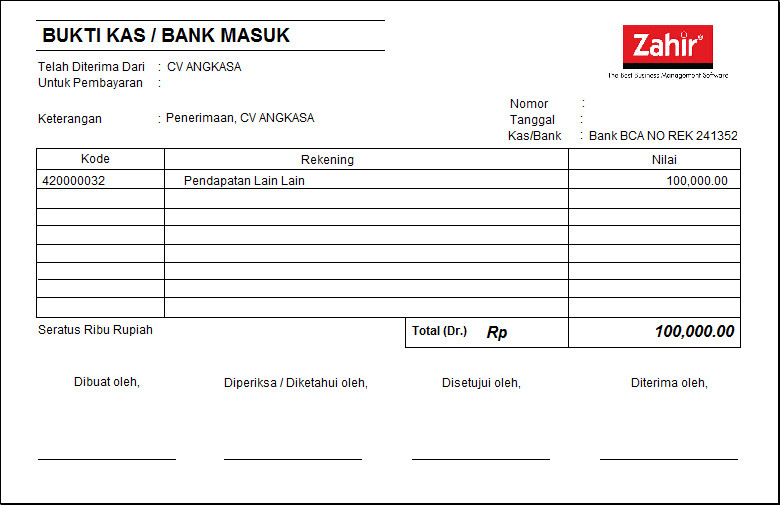
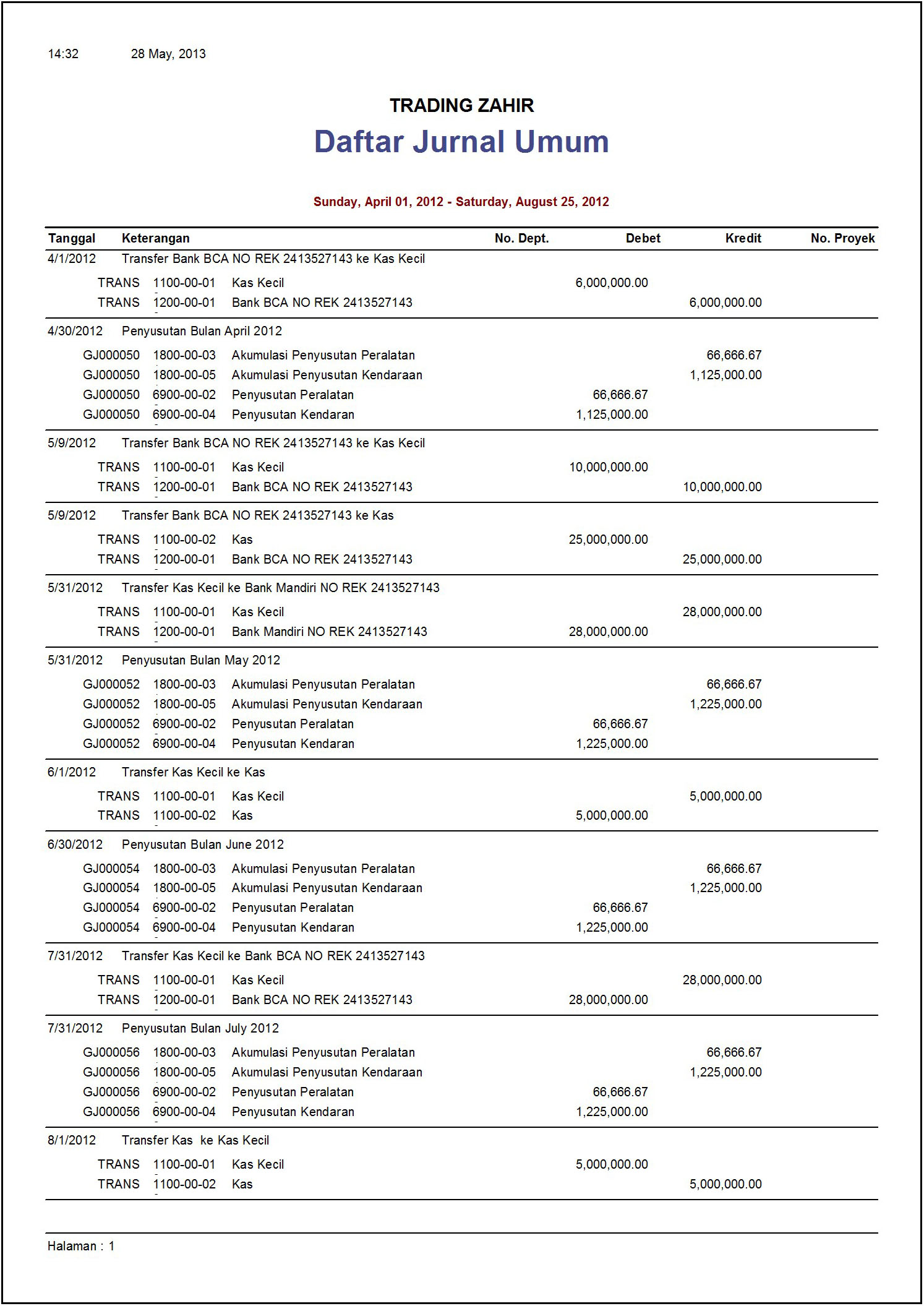
Example Invoice Voucher Cash In

contoh faktur voucher kas masuk

Example Invoice Voucher Cash Out

contoh faktur voucher kas keluar

Source : http://zahiraccounting.com/id/produk/features-dan-keunggulan-zahir/contoh-faktur

Senin, 08 Juli 2013

Zahir Report Server

Zahir Report Server 5.1 is a web-based application, which allows you to view reports and graphs generated by Zahir via the internet using a web browser such as Internet Explorer, Firefox and Safari.

Easy to Use


Simply install Zahir Report Server, specify the location of financial data, then you can directly access enterprise reports from anywhere at anytime, as long as you have an internet connection.

More than 200 Reports Available


Zahir Report Server features a variety of reports designed to help you make business decisions quickly, both standard financial reports such as balance sheet, income statement, cash flow statement analysis reports such as reports to sales per salesman per category of customer, product selling, sales profit per products, etc. ...

Business Analysis Graph


In addition to the financial statements, you can also display a variety of graphics that will allow you to analyze the business quickly.

Reminder System in Calendar


If you always forget when a bill must be paid, when a receivable are collectible and will be liquid when a gyro, then by Zahir Report Server emua problems would be solved, the program will display all receivables, payables and post back in a simple calendar understood.

Get to know your company's performance Fast!

With a variety of reports and graphs analyzing web-based business, will help you as an entrepreneur and leader in the company know the condition quickly and accurately anywhere anytime. Imagine the convenience, you can find out where the best-selling product, selling the best salesman, sales comparison, cost and treasure year (12 months) and a variety of other charts. Everything can be obtained instantly wherever you are.

Compatibility with Zahir Accounting Reports


All reports that you have or have you design Zahir Accounting 5.1 can be used by Zahir Report Server.

Record and Email Reports


The entire report you can export into HTML and PDF formats for your printing, recording, or sent via email to the company's management or co-workers. Just click one button displayed report can be sent via email as an attachment. It's easy!

Note:

To be able to use this program, you must first have Zahir Accounting version 5.1, have installed Firebird Database Server and have an internet connection. If you want to manage your business from anywhere and at anytime, it Zahir Report Server is the right choice!
Source : http://zahiraccounting.com/id/produk/zahir-report-server

Selasa, 25 Juni 2013

Examples of Financial Statements

Here is an example of the financial statements, such as Statements - Income, Balance Sheet, Cash Flow and other supporting reports, generated easily by Zahir accounting software.

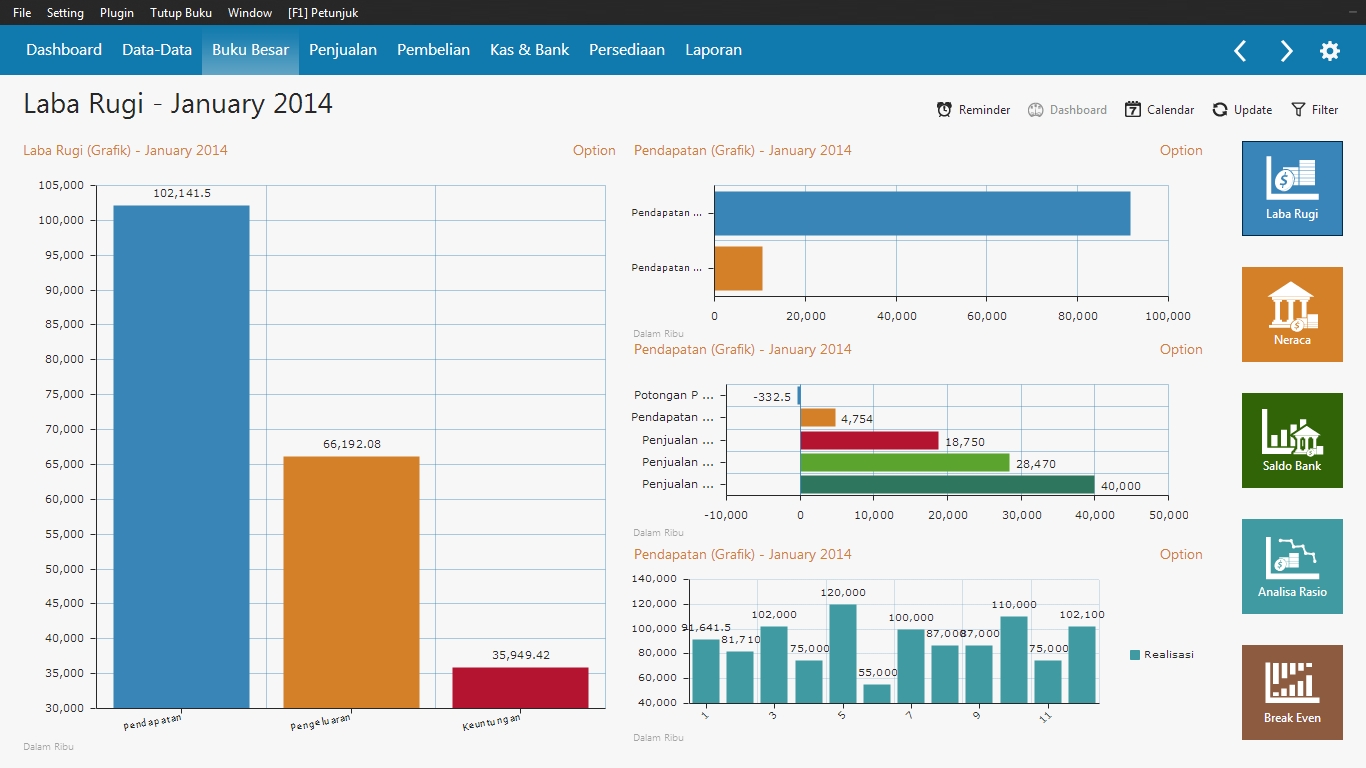
Examples of Financial Statements - Chart Analysis

This chart contains a summary of the financial condition of the company as income statement, balance sheet, and the other, in the form of graphs and tables, so it is easier to analyze and managerial decision making.
Contoh Laporan Keuangan - Grafik Analisa

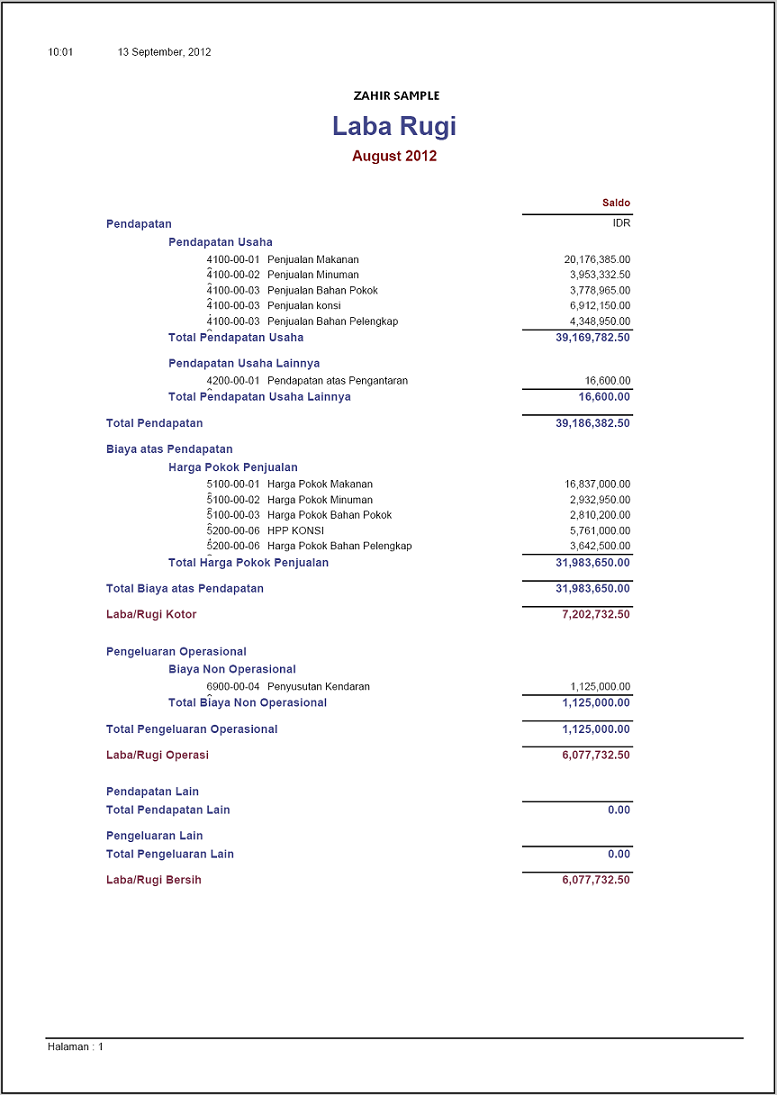
Examples of Financial Statements - Profit and Loss

Contoh Laporan Keuangan Laba Rugi
Contoh Laporan Keuangan - Laba Rugi

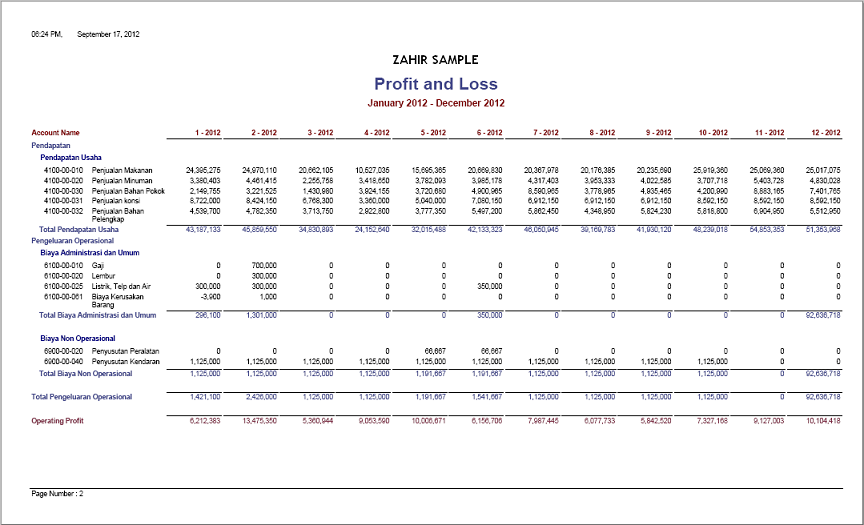
Examples of Financial Statements - Income Statement 12 Months

Contoh Laporan Keuangan - Laba Rugi 12 Bulan

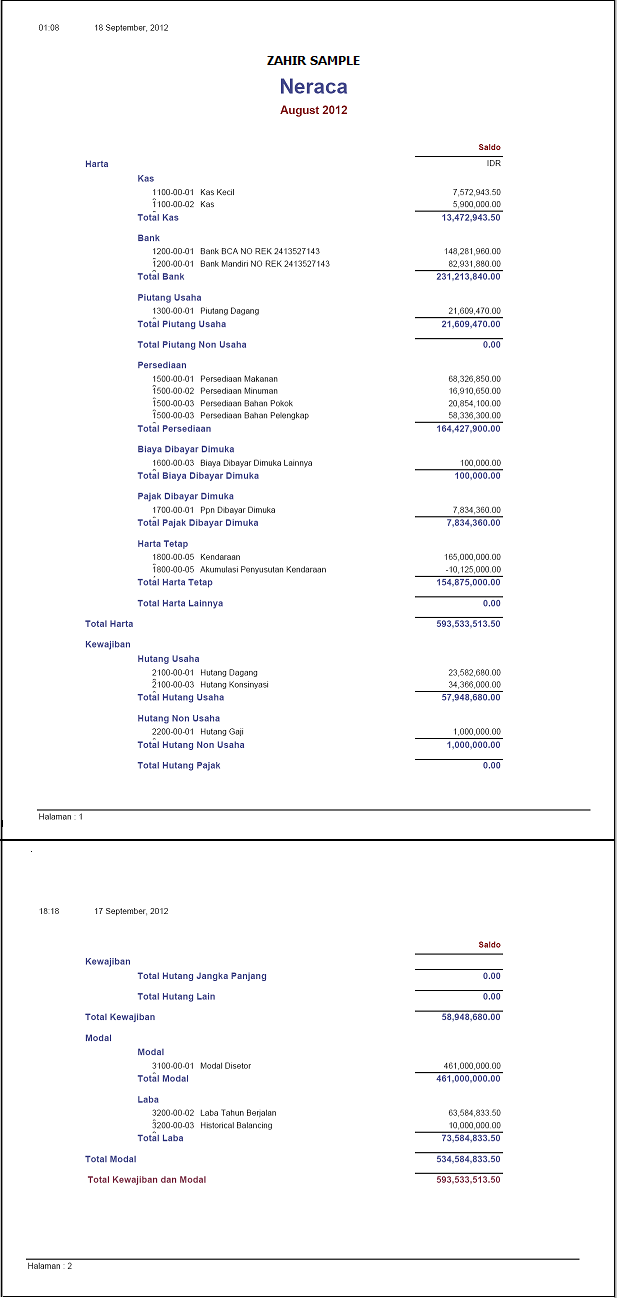
Examples of Financial Statements - Balance Sheet

Contoh Laporan Keuangan - Neraca

Examples of Financial Statements - Cash Flow

Contoh Laporan Keuangan - Arus Kas

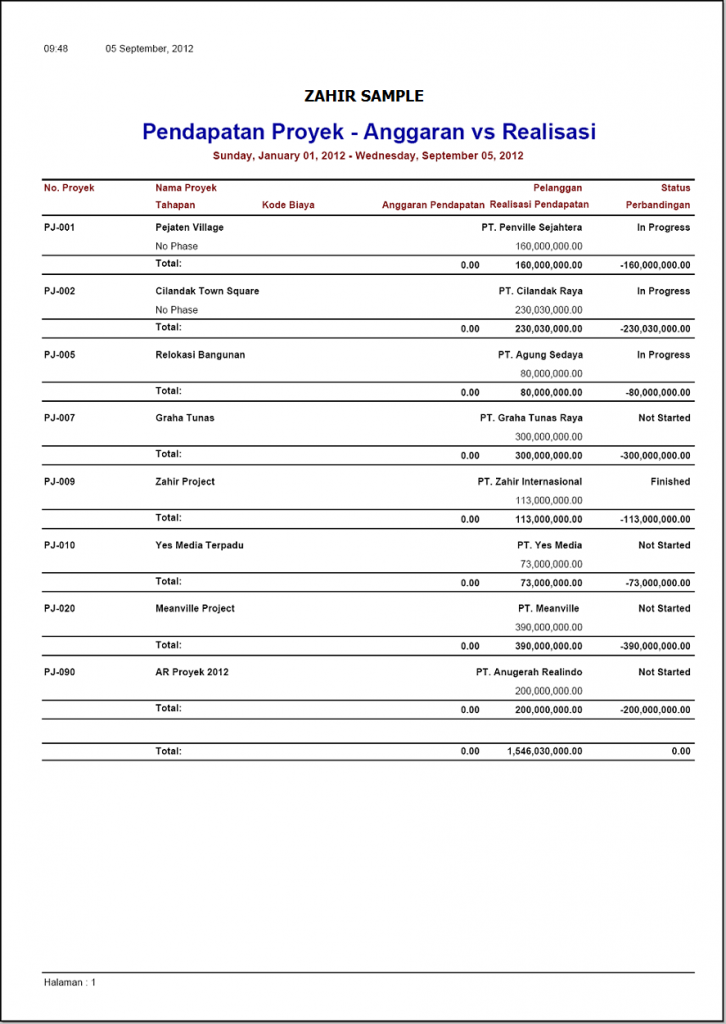
Examples Income Statement Job

Contoh Laporan Pendapatan Proyek

Examples of Project Activity Report

Contoh Laporan Aktifitas Proyek

Goods Movements Per Sample Report Warehouse

Contoh Laporan Mutasi Barang Per Gudang

Best-Selling Products Sample Report

Contoh Laporan Barang Paling Laris

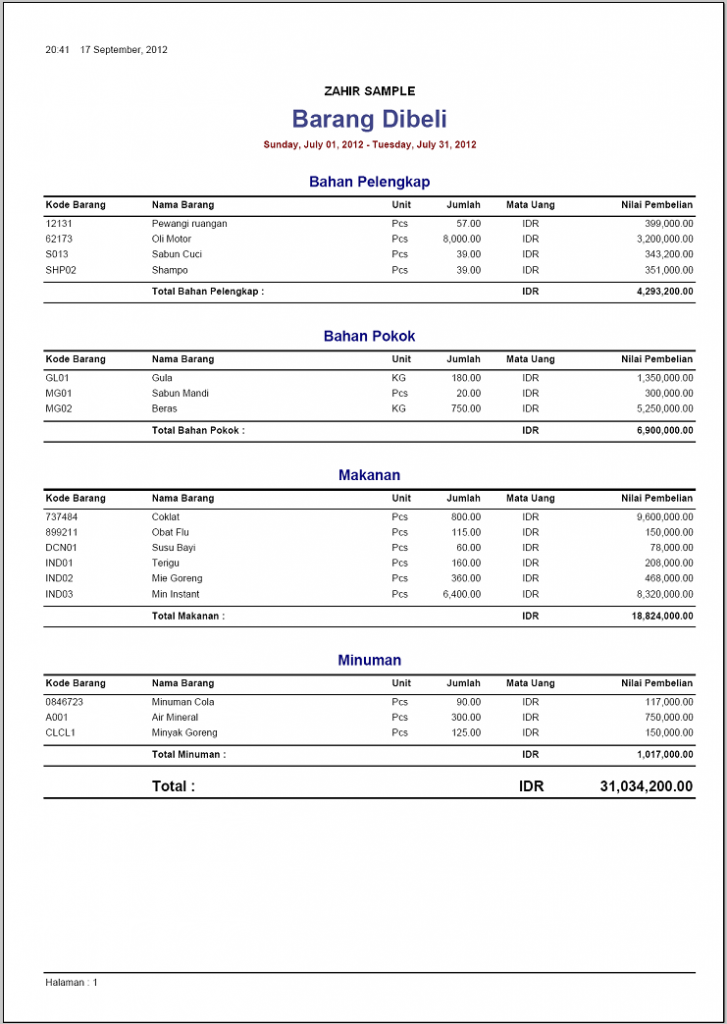
Sample Report of Goods Purchased

Contoh Laporan Barang Dibeli

Goods List Sample Report

Contoh Laporan Daftar Barang

Examples of General Ledger Reports

Contoh Laporan General Ledger

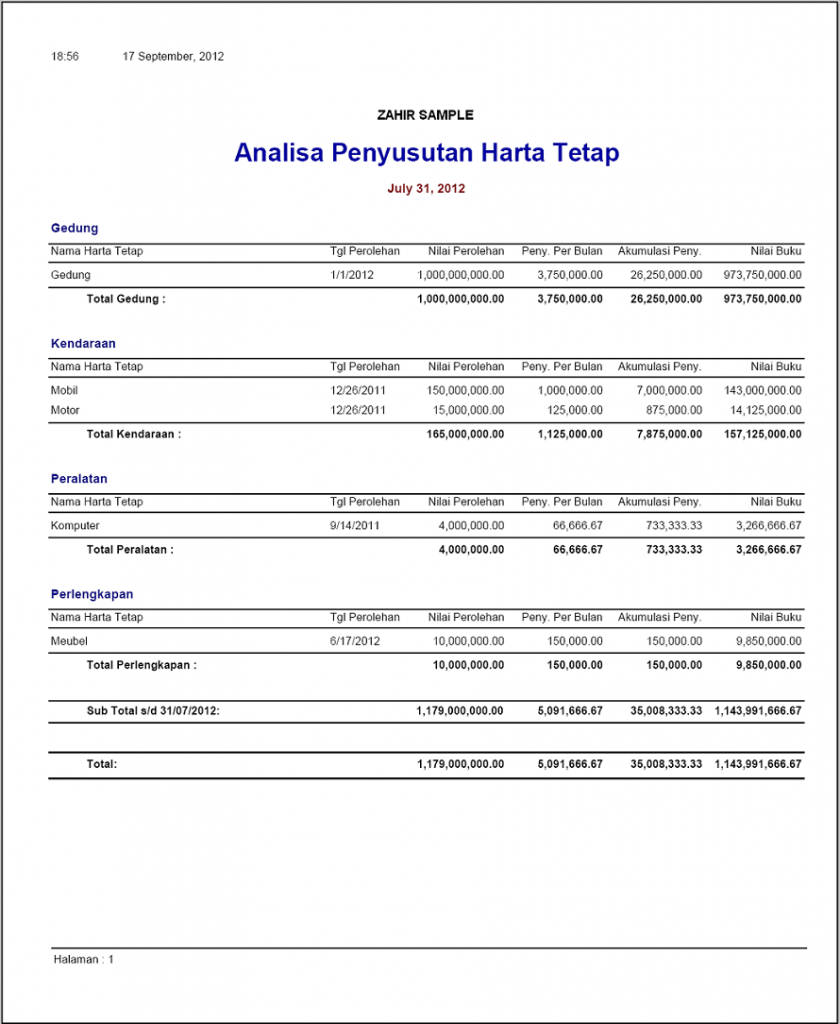
Examples of Fixed Assets Depreciation Analysis Report

Contoh Laporan Analisa Penyusutan Harta Tetap

Example Journal

Contoh Jurnal

Examples Ledger


Contoh Buku Besar
Contoh Buku Besar

Source : http://zahiraccounting.com/id/contoh-laporan-keuangan

Jumat, 24 Mei 2013

HowTo: Create Design Reports in Zahir Accounting

Zahir, one of the best accounting software today is already providing a lot of reports are very informative; However, because the characteristics of each company varies from one company to another, sometimes companies need a report with a different format to that provided by Zahir Accounting and is often nauseating person designated to make the report.
Surely Zahir Accounting software developers since the beginning has been realized that the characteristics of each company are not the same so although Zahir Accounting has been providing a lot of reports in general can represent the information needs of the company, Zahir Accounting also provides the facility to allow users to design reports can more freely explore themselves in designing reports suit their individual needs.
Facility Design Report is expected to make the user more innovative in making a report in accordance with the demands of the information needs of users are facing. But apparently the lack of user knowledge about Zahir, most of them just ignore this very powerful feature even many of them actually make the report manually. This is contrary to the intended use of the software is supposed to make the job quick and easy automatic.
In conducting the report design is actually not too difficult and the most important thing in this case was willing to try. However, because the display menu design looks complicated at first glance, most people 'lose before the match', but practice is not as complicated as one might imagine. Hence, the following will be explained in general about the report design facility.
How to enter the design menu by right-clicking the report is a report that we want to design and select design.
How to Log Zahir Reports Menu Design
Here is a view Report Design menu
Display Menu Design Zahir Reports
Menu Design Zahir Reports
A. Menubar
Menubar is a region of the screen or application interface where drop down menu will appear. The purpose is to provide a menu bar to access the general location of the special menu that provides access to certain functions.
B. Toolbar
Toolbar is symbolized in the form of menu icons which function to execute certain commands to manage and process the object. Toolbar grouped by function and adjacent interconnected.
C. Object Inspector
Object Inspector is a menu containing the arrangements which the object being pointed to.
D. Data Tree
Data Tree is a list of fields from a database that can be incorporated into a report that is being designed.
E. Report Tree
Report Tree is a list of objects contained in the report is in design.
F. Workspase
Workspase a worksheet that are in the design report.
The tips in Conduct Design Report
1. To help us design a report in accordance with what we want, select the report that it most closely with the reports that we want to make so we simply edit the position without having to make or find the data which we will enter.
2. To add text or images or other objects can be directly inserted by using the tools available to the left of the worksheet, click on the tool, navigate to the location that we want to enter, click the datafield to include Fx (Insert Expression), select the datafield who want to be included until the formula datafield on at the bottom, claim OK, click the green checklist that there ditampilannya.
Insert Expression
Insert Expression
Insert Expression
Insert Expression
Insert Expression
Insert Expression
3. The default file location zahir accounting reports are in C: \ Program Files \ Zahir .... System Ver. 5.1 \ Reoprts_Id to reports in Indonesian and Reports for reports in English; grouped into folders based on type of report. In order to report that we are trying not to change the design of an existing report, save as a report that we design to the same location with a different name, so if there is an error while doing the design of the report, there were reports in the original so that it can re-design.
Save As
Save As
4. Before we save the report design, click the preview button first, make sure the report is in accordance with what we want, and no mistakes or errors, which means that if it does not fit or there is an error we can undo all our previous design.
Preview
Preview
5. To change the settings object as font, size, color, and so on, select the object you want to change settings, and define the settings in the Object Inspector (if there is no display on the screen the Object Inspector can be displayed by clicking on the view >> toolbars >> Object Inspector)
Object Inspector
Object Inspector
Object Inspector
6. Not all datafield can be put into the same location, because each field in each dataset master datafield is concerned, for example when we are designing a sales report, the data that can be raised only data related to sales only, no could lead to the purchase of data, supplier data, and so on that are not derived from the sale of inputting. To see what data can be incorporated into the reports that are in the design, can be seen in the Data Tree to the report (if there is no display on the screen Data Tree could appear by clicking view >> toolbars >> Data Tree)
Data Tree
Data Tree
Data Tree
Data Tree
7. Datafield you want to display only the bottom can be raised, can not be raised laterally. If you want grouped by several categories, it is done by creating a group header or group footer, can not be used as a new column.
8. To change the regional settings such statements decimal format, date format, and so on is done by right-clicking the object in question, then select the display format, otherwise do not want to use a decimal, format string is replaced with%% 2.2n 2.n, other formats can be selected to suit with desirable.
Display Format
Display Format
Display Format
Display Format
9. In order to facilitate the move or resize the object so neat, to shift the object can use CTRL + arrows to resize an object while can use Shift + arrow.
10. Lastly, the most important thing in doing the design of the report back to the word willing to try.If you do not understand how to create a formula calculation function datafieldnya, look at the formula calculation functions that already exist, and then compare it to the original source datafield, compare well with reports that there are others.
Source: http://softwarebisnis.com/uncategorized/desain-laporan-pada-zahir-accounting

Kamis, 16 Mei 2013

Pencegahan Kerusakan Pada Dongle


Secara umum kerusakan dan perubahan ID dongle terjadi karena 3 hal:


  1. overheat / panas berlebih
  2. magnetic influence / pengaruh medan magnet
  3. unstability voltage / voltase tegangan yang tidak stabil

@ 1 = yaitu kondisi dimana fisik dongle mendapat panas berlebih dari komputer. Solusi secara umum dengan menambahkan kabel usb extension agar panas dari casing komputer tidak langsung menyalur ke body dongle.

Selasa, 04 Desember 2012

Profil Produk Zahir Flexy Money


Zahir FlexyMoney dirancang untuk individu dan usaha kecil bidang jasa yang memerlukan
pembukuan sederhana dan praktis untuk mengelola piutang usaha, hutang, pembayaran
pelanggan, tagihan dan pembuatan laporan keuangan.

Mudah Digunakan!


Kesederhanaan adalah keunggulan utamanya, sangat mudah digunakan tanpa memerlukan
pemahaman teori akuntansi yang mendalam, Anda dapat membayar tagihan dengan mudah,
menginput penjualan, mencetak faktur dan laporan keuangan dengan serba otomatis.

Pilih pelanggan, tentukan rekening yang sesuai, isi jumlah dan harga satuan, selanjutnya
Zahir FlexyMoney akan membuat jurnal akuntansi, mencatat piutang usaha dan membuat laporan
untuk Anda secara otomatis.

Mengelola Pembayaran


Memudahkan Anda dalam mengelola piutang usaha, mencetak laporan umur piutang, membuat
surat tagihan untuk mengingatkan pelanggan akan tagihan yang harus mereka bayar.

Bayar tagihan dari pemasok, tulis cek untuk pembayaran dengan mudah, cukup pilih nama
pemasok, pilih nomor faktur yang akan dibayar dan jumlah yang akan dibayar, semuanya serba
mudah dan otomatis, bahkan Anda dapat membayar dengan giro mundur.

Rekonsiliasi Bank


Setiap bulan bank akan mengirimkan laporan transaksi bulanan, Anda dapat melakukan
rekonsiliasi (penyamaan) dengan pencatatan oleh software secara mudah, bila perlu Anda dapat
membuat penyesuaian dan mencetak laporan rekonsiliasi bank.

Sistem 'Reminder' dalam Bentuk Kalender


Bila selama ini Anda selalu lupa kapan suatu tagihan harus dibayar, kapan suatu piutang dapat
ditagih dan kapan suatu giro akan cair, maka dengan Zahir FlexyMoney semua masalah itu akan
teratasi, program akan menampilkan seluruh piutang, hutang dan giro mundur dalam suatu
kalender yang mudah dipahami.

Kenali Kinerja Perusahaan Anda dengan Cepat!


Program dilengkapi dengan berbagai grafik dan analisa keuangan yang lengkap dalam satu layar,
yang memudahkan Anda sebagai pengusaha dan pemimpin dalam mengetahui kondisi
perusahaan secara cepat dan akurat.

Bayangkan kemudahan ini, Anda dapat mengetahui mana pelanggan terbaik Anda, salesman
terbaik, kelompok produk paling laris, produk yang paling menguntungkan, produk yang paling
rugi, kinerja produk per kategori pelanggan dan berbagai grafik lainnya. Semuanya dapat
diperoleh seketika!

Fasilitas Laporan yang Menakjubkan!


Seluruh Faktur dan laporan dapat Anda desain ulang sesuai kebutuhan usaha Anda. Fasilitas
Report Designer yang disediakan sangat mudah digunakan dengan interface visual yang menarik.

Bagi manajer keuangan atau akuntan yang ingin mengaudit laporan keuangan, cukup klik pada
nilai-nilai di laporan keuangan, program otomatis menampilkan laporan perinciannya, dan klik
kembali untuk menampilkan transaksi sebenarnya.

Seluruh laporan dapat Anda export ke dalam berbagai format seperti MsExcel, MsWord, HTML,
PDF, Text, dll. Dengan fasilitas export ini, Anda dapat mengolah lebih lanjut seluruh
laporan melalui program MsOffice.

Cukup klik satu tombol seluruh laporan dapat di kirim melalui email dengan berbagai format yang
attacment yang Anda inginkan. Sungguh mudah!

Fasilitas Dapat di Upgrade!


Bila usaha Anda telah berkembang dan Anda membutuhkan fasilitas seperti multi currency, multi
gudang, atau fasilitas-fasilitas lainnya yang ada di Edisi Enterprise, maka Anda dapat menambah
fasilitas-fasilitas tersebut sewaktu-waktu tanpa perlu membuat data keuangan baru.

Dengan kemampuang upgrade fasilitas ini, Anda tidak perlu membayar fasilitas extra yang tidak
Anda gunakan! Sehingga investasi IT Anda menjadi lebih efisien.

Untuk Anda!


Jika Anda ingin mengelola uang dan usaha jasa Anda dengan mudah dan cepat, maka Zahir
FlexyMoney adalah satu - satunya pilihan yang tepat!

Features:


  • General Ledger
  • Piutang Usaha
  • Hutang Usaha
  • Penjualan Jasa
  • Pembelian Jasa
  • Kas & Bank
  • Pembayaran Pelanggan
  • Pembayaran ke Pemasok
  • Penghapusan Hutang/Piutang
  • Giro Mundur
  • Rekonsiliasi Bank
  • Kelebihan Pembayaran
  • Transaksi Berulang
  • Grafik-Grafik, Rasio Keuangan, Kalender dan 100 Laporan
  • Laporan dapat didesain dan dikembangkan sendiri
  • Laporan dapat diklik untuk menampilkan detail transaksi (Drill-Down)
  • Pencarian text pada laporan secara cepat
  • Export Laporan ke Excel, PDF, HTML, dll dalam tampilan aslinya dan dapat dikirim melalui email.
  • Desain Cetak Faktur dan Faktur Pajak
  • Multi Company, Multilevel Password
  • Multi User (Pembelian 1 paket program untuk 1 komputer)
  • Bahasa Indonesia, Bahasa Malaysia dan Bahasa Inggris

* diambil dari PDF file product profile zahir accounting 5.1
Senin, 03 Desember 2012

Profil Produk Zahir Small Business Accounting

Zahir Small Business Accounting dirancang untuk usaha kecil yang baru memulai usaha dalam
berbagai bidang yang memerlukan pembukuan sederhana, praktis dengan harga yang sangat
terjangkau, untuk mengelola persediaan barang sederhana, mengelola piutang usaha, hutang,
pembayaran pelanggan, tagihan dan pembuatan laporan keuangan praktis.


Mudah Digunakan!


Kesederhanaan adalah keunggulan utamanya, sangat mudah digunakan tanpa memerlukan
pemahaman teori akuntansi yang mendalam, Anda dapat membayar tagihan dengan mudah,
menginput penjualan, mencetak faktur dan laporan keuangan dengan mudah dan otomatis.

Saat terjadi penjualan, buka formulir penjualan, pilih pelanggan, tentukan barang yang akan
dijual, isi jumlah dan harga satuan, selanjutnya Zahir Small Business Accounting akan membuat
jurnal akuntansi, menghitung harga pokok barang, mencatat piutang usaha dan membuat laporan
untuk Anda secara otomatis.

Mengelola Persediaan Barang Sederhana


Setiap transaksi penjualan secara otomatis akan menghitung harga pokok penjualan
menggunakan metode rata-rata, secara otomatis akan membuat jurnal penyesuaian persediaan,
mengurangi jumlah barang di gudang, ini berarti Anda dapat mengetahui jumlah barang setiap
saat tanpa menunggu penghitungan stock opname diakhir bulan.

Mengelola persediaan barang menjadi sangat mudah, Anda dapat melakukan stock opname kapan
saja, mencetak kartu stock, melacak penjualan setiap barang, mengetahui keuntungan penjualan
per barang, dan lain sebagianya.

Mengelola Pembayaran


Memudahkan Anda dalam mengelola piutang usaha, mencetak laporan umur piutang, membuat
surat tagihan untuk mengingatkan pelanggan akan tagihan yang harus mereka bayar.

Bayar tagihan dari pemasok, tulis cek untuk pembayaran dengan mudah, cukup pilih nama
pemasok, pilih nomor faktur yang akan dibayar dan jumlah yang akan dibayar, semuanya serba
mudah dan otomatis.

Rekonsiliasi Bank


Setiap bulan bank akan mengirimkan laporan transaksi bulanan, Anda dapat melakukan
rekonsiliasi (penyamaan) dengan pencatatan oleh software secara mudah, bila perlu Anda dapat
membuat penyesuaian dan mencetak laporan rekonsiliasi bank.

Sistem 'Reminder' dalam Bentuk Kalender


Bila selama ini Anda selalu lupa kapan suatu tagihan harus dibayar, kapan suatu piutang dapat
ditagih dan kapan suatu giro akan cair, maka dengan Zahir Small Business Accounting semua
masalah itu akan teratasi, program akan menampilkan seluruh piutang dan hutang dalam suatu
kalender yang mudah dipahami.

Kenali Kinerja Perusahaan Anda dengan Cepat!


Program dilengkapi dengan berbagai grafik dan analisa keuangan interaktif yang lengkap dalam
satu layar, yang memudahkan Anda sebagai pengambil keputusan untuk mengetahui kondisi
perusahaan secara cepat dan akurat.

Bayangkan kemudahan ini, Anda dapat mengetahui mana pelanggan terbaik Anda, salesman
terbaik, produk yang paling menguntungkan, produk yang paling rugi, dan berbagai grafik
menarik lainnya. Semuanya dapat diperoleh seketika tanpa ada proses apapun selain mengisi
formulir penjualan dan pembelian!

Fasilitas Laporan yang Menakjubkan!


Bagi manajer keuangan atau akuntan yang ingin mengaudit laporan keuangan, cukup klik pada
nilai-nilai di laporan keuangan, program otomatis menampilkan laporan perinciannya, dan klik
kembali untuk menampilkan transaksi sebenarnya.

Seluruh laporan dapat Anda export ke dalam berbagai format seperti MsExcel, MsWord, HTML,
PDF, Text, dll. Dengan fasilitas export ini, Anda dapat mengolah lebih lanjut seluruh
laporan melalui program MsOffice.

Cukup klik satu tombol seluruh laporan dapat di kirim melalui email dengan berbagai format yang
attacment yang Anda inginkan. Sungguh mudah!

Kapasitas dan Fasilitas Dapat di Upgrade!


Bila usaha Anda telah berkembang, dimana jumlah item barang Anda telah melebihi 1000 item
atau nilai penjualan Anda telah lebih dari 100juta, maka hubungi kami untuk meningkatkan
kapasitas software menjadi tidak terbatas.

Atau bila Anda membutuhkan fasilitas seperti giro mundur, multi currency, multi gudang, atau
fasilitas-fasilitas lainnya yang ada di Edisi Enterprise, maka Anda dapat menambah fasilitas-
fasilitas tersebut sewaktu-waktu tanpa perlu membuat data keuangan baru.

Dengan kemampuang upgrade fasilitas ini, Anda tidak perlu membayar fasilitas extra yang tidak
Anda gunakan! Sehingga investasi IT Anda menjadi lebih efisien.

Untuk Anda!


Jika Anda ingin mengelola uang dan usaha kecil Anda dengan mudah dan cepat namun bugjet
Anda terbatas, maka Zahir Small Business Accounting adalah satu - satunya pilihan yang tepat!

Fasilitas :


  • General Ledger
  • Piutang Usaha
  • Hutang Usaha
  • Penjualan Barang
  • Pembelian Barang
  • Persediaan (dengan metode Rata-Rata)
  • Stock Opname dan Penyesuaian Persediaan
  • Penentuan Harga Jual
  • Kas & Bank
  • Pembayaran Pelanggan
  • Pembayaran ke Pemasok
  • Penghapusan Hutang/Piutang
  • Rekonsiliasi Bank
  • Kelebihan Pembayaran
  • Berbagai Grafik, Rasio Keuangan, Kalender dan 80 Laporan
  • Laporan dapat diklik untuk menampilkan detail transaksi (Drill-Down)
  • Pencarian text pada laporan secara cepat
  • Export Laporan ke Excel, PDF, HTML, dll dalam tampilan aslinya dan dapat dikirim melalui email.
  • Desain Cetak Faktur dan Faktur Pajak
  • Multi Company, Multilevel Password (Max 5 user terdaftar)
  • Multi User (Pembelian 1 paket program untuk 1 komputer)
  • Bahasa Indonesia, Bahasa Malaysia dan Bahasa Inggris


* diambil dari PDF file product profile zahir accounting 5.1
 
Diberdayakan oleh Blogger.